How to get all your medical records in one place
Upload your files once. MyLifeID organizes your digital health records, flags what’s missing, and lets you share your full history with any doctor in minutes.
MyLifeID takes you from setup to sharing. You start your account and upload your files, MyLifeID organizes them and checks for gaps, and from there your record is ready when you need it, in an emergency, and with any doctor you choose to share it with.
7,600+
US health systems’ files accepted
HIPAA compliant
Encrypted, stored and sent
Nearly 100 languages
For multi-lingual families or travel
Works in any browser
No app to download
Here's how it works. Setup to Sharing.
Most of the work is done for you.
1.
Set Up Your Account
Sign up online and open your MyLifeID account in any web browser. Your account includes your physical MyLifeID card. You don’t have to type in years of history. Instead, download your digital health records from each doctor portal, such as MyChart, and upload them to your account. MyLifeID accepts files from 7,600+ US health systems. You can add files from fitness devices and apps the same way, and add anything else yourself.
Most portals let you download your records or send a medical records request, and a doctor’s office can send files if you ask. Looking for old records? Check the portal’s document or visit history first.
Need a records release form? Many doctors’ offices ask you to sign a release form before they send your records to you or to another doctor. It may be called a HIPAA release form, a release of information form or an authorization form. Ask the records office for theirs.
2.
Your Data - Organized and Verified
MyLifeID organizes your medical records by sorting the digital health records you upload into one clear picture of your health history. AI reviews them and flags information that is missing, incomplete or incorrect. Your Medical Record Completeness Score shows how complete your record is, covering items like blood type, vaccines, allergies and lab results. An audit trail shows where every record came from.
MyLifeID flags what’s missing, so you don’t have to hunt for it.
3.
Store Medical Records - Access Them Anywhere
Switching doctors? Need out-of-network care? Traveling abroad? Now you can store your online medical records in one place and open in any web or mobile browser. There is no software to install. View and request them translated them in nearly 100 languages, at home or far from it.
4.
Emergency Access When It Matters
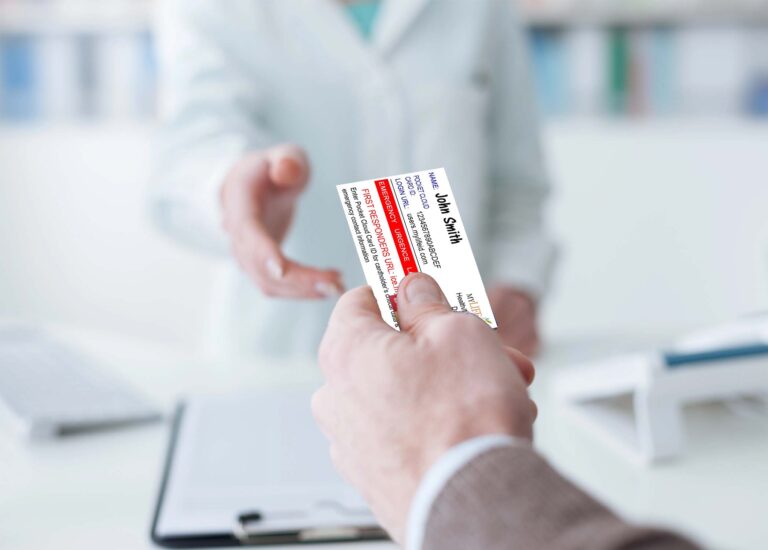
Every account comes with a wallet-sized card that fits in your wallet with a QR code and your account ID. In an emergency, first responders can scan the QR code for instant access to your digital health record including critical information — blood type, allergies, medications, and emergency contacts. No password needed. You can also give ongoing access to a spouse, partner, or loved one, so the people who matter most are never locked out.
5.
Share With Providers - On Your Terms
You decide who sees your online medical records and when. Need to hand your history to a new doctor or hospital? Share your digital health record straight from your account. No paper files, no phone calls to old providers. Import and export tools let you exchange data with other health systems. Share it in minutes, without waiting weeks for files to transfer. You can end their access any time.
You choose who sees your record, and you can end access any time.
That's the full process, from MyLifeID account setup to medical record sharing. Here's everything else that comes with your account.
Your records stay yours
You decide who sees your information, and you can change your mind any time.
Encrypted
Your information is encrypted where it is stored and while it is sent.
Your access rules
Store medical records, choose who sees your record and why. You can grant a new doctor access or end it at any time.
HIPAA compliant
The platform is built to meet healthcare privacy rules.
Any device
Use your phone, PC or tablet, in any browser. No app to download.
Nearly 100 languages
Read and translate your record when you travel or when family speaks another language.
Health alerts
Get reminders for age-based screenings and a heads-up before a vaccine expires.
MyLifeID isn't insurance. It's your health history, organized and ready to share.
What goes in your complete health history
Your MyLifeID online account holds the details a new doctor asks for first, plus the files behind them.
- Emergency Contacts
- Blood Type & Donor Status
- Medical/Treatment History
- Immunization Records
- Prescriptions
- Allergies
- X-rays, EKG, and Lab Test Results
- Doctor's Contact Information
Medical record questions people ask
How do I get all my medical records in one place?
Download the files from each of your doctor portals, then upload them to your MyLifeID account. MyLifeID accepts files from 7,600+ US health systems and sorts them into one clear picture of your health history.
How do I find or request my old medical records?
Start with each doctor’s patient portal, where you can often download your records or send a request. If a provider has no portal, ask its records office for a copy. Then upload what you receive to MyLifeID.
Do I need a release form to get my medical records?
Often, yes. Many doctors’ offices and hospitals ask you to sign a release form, also called a HIPAA release form or release of information form, before they send your records to you or to another doctor. Some patient portals let you download your records without one. Ask the provider’s records office what it needs.
Does MyLifeID connect to MyChart?
MyLifeID doesn’t log in to your portals for you. You download your files from MyChart or another portal and upload them. MyLifeID keeps them together with your other records.
How do I share my medical records with a new doctor?
Share your record from your account. A new doctor or hospital can see your full history in minutes, and you can end their access at any time.
What is a personal health record?
It’s your own copy of your medical history, kept by you instead of by each doctor. MyLifeID holds your records from every provider in one place, checks them for gaps and lets you share them.
What is a Comprehensive Patient Profile?
A Comprehensive Patient Profile is the complete picture of your health history that MyLifeID builds from the files you upload. It brings your records from every doctor, plus files from fitness devices and apps, into one organized view, with items such as medications, allergies, immunizations, lab results and emergency contacts. MyLifeID checks it for gaps and shows how complete it is, so you can share your full history with any doctor you choose.
Where can I store my medical records online?
Store them in your MyLifeID account. Upload the files you download from your doctor portals and apps, and MyLifeID keeps your online medical records together in one secure, encrypted account.
Is MyLifeID a medical records app?
MyLifeID is a secure online account, not an app. It works in any web browser on your phone, PC or tablet, so there is nothing to download.
Are my medical records secure and private?
Your information is encrypted where it is stored and while it is sent, and the platform is HIPAA compliant. You decide who sees your record.
How much does MyLifeID cost?
The MyLifeID Online Account is $29.95 a month, or save 17% when you pay yearly. It includes your secure account, alerts for missing or mismatched information, sharing with any doctor, and a physical MyLifeID card with a QR code and account ID. It’s HSA/FSA eligible. See the full plan.
Can I use my HSA or FSA to pay?
Yes, if you have an HSA card or a dual HSA/FSA debit card. Because MyLifeID is a qualified medical information plan under IRS Revenue Ruling 71-282, your subscription is fully eligible for health spending reimbursement.
If you have an HSA or a combined HSA/FSA card: You can use your card directly at checkout just like a standard credit card. Every purchase includes an itemized receipt to save for your records.
If you have a strict FSA-only card: Your card will likely be declined at checkout. This is because traditional FSA cards require a physical retail barcode to approve a purchase. If this happens, simply use a standard credit card to check out, and submit your itemized MyLifeID receipt to your plan administrator for manual reimbursement.
Plans vary, so check with your administrator if you’re unsure. This isn’t tax advice.
Have your records ready the next time a clinic asks.
SAVE 17% WHEN YOU PAY YEARLY

MyLifeID is a medical information plan. Under IRS Revenue Ruling 71-282 and Internal Revenue Code §213(d), you can use your HSA, FSA or HRA to pay. Plans vary, so check with your administrator if you’re unsure. This isn’t tax advice.